Order Types
Market, limit, stop, stop-loss, take-profit, trailing stop and OCO orders explained, with examples of when to use each one to execute your plan precisely.
- Lesson 5 of 30
- 3 min read
- Beginner
- Updated


Key takeaways
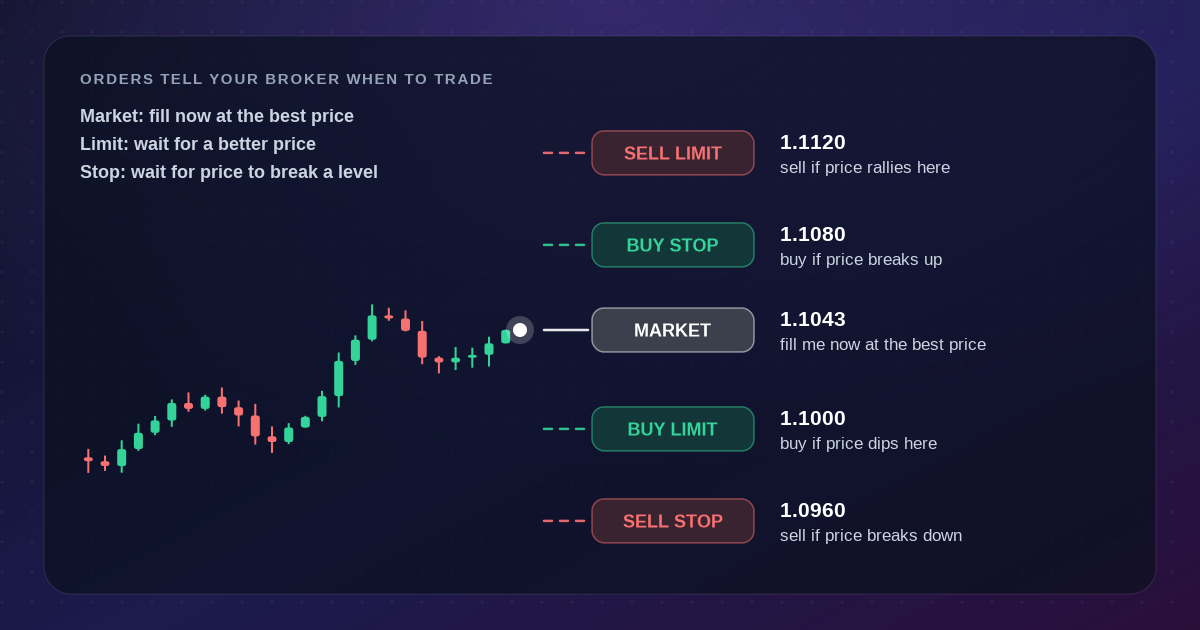
- A market order fills immediately at the best available price; in fast markets that price can slip.
- Limit orders wait for a better price: a buy limit sits below the market, a sell limit above it.
- Stop entry orders wait for a breakout: a buy stop sits above the market, a sell stop below it.
- Stop-loss, take-profit, trailing stop and OCO orders automate your exits, so set them before you enter.
Mastering Forex Order Types
Think of orders as instructions you whisper to your broker 🔊. Send the wrong message and you might get filled in a place you never intended. Let’s run through the most common types-friendly, no-jargon style-so the next time you click Buy or Sell, you know exactly what will happen.
Market Order
“Fill me now at the best available price.” 🚀 Perfect for fast moves, but remember spreads can widen when things get hectic.
# Example (EUR/USD)
BUY 1 lot @ Market
→ filled instantly at 1.1043
Limit Order
“Only fill me if price is better than this.” Great for buying dips or selling rallies with precision.
BUY LIMIT 1 lot EUR/USD @ 1.1000
(you’ll never pay more than 1.1000)
Stop (Entry) Order
“Get me in if price breaks this level.” Used for breakout strategies-momentum must prove itself first.
BUY STOP 1 lot EUR/USD @ 1.1080
(executes once ask ≥ 1.1080)
Stop-Loss (SL)
The seat-belt of trading. Closes your position automatically to cap risk if price moves the wrong way.
Take-Profit (TP)
Locks in gains at a pre-set target. No more waking up to see your perfect trade round-tripped!
Trailing Stop
A dynamic stop-loss that follows price at a fixed distance. It lets winners breathe while still protecting profits.
OCO (One Cancels the Other)
Two linked orders-usually a stop and a limit. Whichever fills first automatically cancels the other. Handy around major news events 🔔.
Cheat-Sheet
| Order | Executes When… | Typical Use |
|---|---|---|
| Market | Immediately | Enter/exit fast |
| Limit | Price is better than set level | Buy dips / sell rallies |
| Stop (Entry) | Price breaks level | Breakout trades |
| Stop-Loss | Price hits risk point | Limit downside |
| Take-Profit | Price hits target | Lock gains |
| Trailing Stop | Follows price by X pips | Ride trends, protect profit |
Pro tip: decide your SL and TP before you place the trade- then let the orders do the emotional heavy lifting. Your future self will thank you. 🙌
Frequently asked questions
What is the difference between a limit order and a stop order?
A limit order fills only at your price or better, so buy limits go below the current price and sell limits above it. A stop order triggers when price reaches a level and then fills at market, so buy stops go above the price and sell stops below it, usually to catch breakouts or to cap losses.
What is a trailing stop?
A trailing stop is a stop-loss that follows price at a set distance as the trade moves in your favour, but never moves back. It locks in profit while giving a trend room to run.
What is an OCO order?
OCO means one cancels the other: two linked orders, often a buy stop above a range and a sell stop below it. When one fills, the other is cancelled automatically, which is useful ahead of major news.
Put it into practice with Tracom's trade journal, risk calculator and signal record. Free to download.